


.svg)
.svg)





Why HubSpot Salesforce Integration Is Important
There is no one tool that can do everything for business marketing, sales and customer relations. HubSpot and Salesforce are two platforms. Integrating them helps businesses work efficiently. HubSpot Salesforce integration ensures that there is no leaky data between the marketing and sales teams.
HubSpot is a marketing tool for attracting, engaging, and nurturing leads, and Salesforce is a customer relationship management platform for managing sales pipelines and customer relationships. Combined, both systems provide access to correct data, minimise manual tasks and enhance collaboration. A lot of organizations also rely on professional HubSpot integration services to make the process much easier, and to prevent from common integration issues.
HubSpot vs Salesforce: What’s the Difference?
Both platforms offer customer management, but they come with different functions. HubSpot is majorly dedicated in marketing automation, lead generation, content management, and customer engagement. Salesforce is a powerful CRM application for tracking opportunities, managing customers, and forecasting sales.
Many businesses do not just pick one platform; they use both at the same time with HubSpot CRM Salesforce Integration. This way, marketing teams can use good automation tools. Sales teams can get a lot of details about the customers.
When organizations connect HubSpot to salesforce, they can have a single source of customer information, enhancing visibility across departments and aiding informed decision-making.
Why Businesses Integrate HubSpot with Salesforce
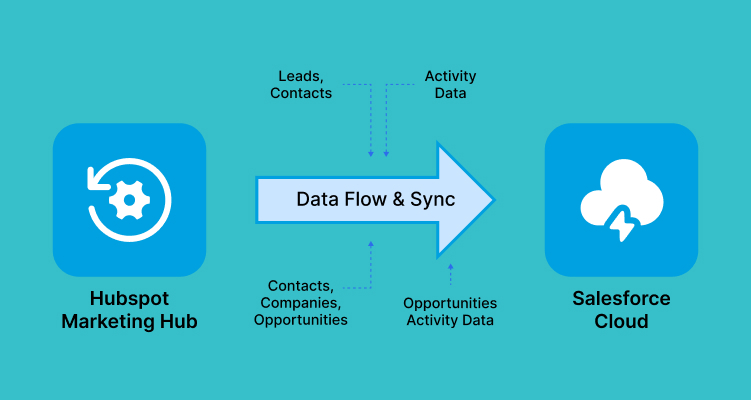
The main reason companies decide to integrate HubSpot with Salesforce is to ensure better sales and marketing alignment.
In the absence of integration, customer information is lost within silos and can be challenging to collaborate on. Marketing teams may know more about the engagement of leads, but not have access to that data. Through integration, these gaps are removed and both platforms are synchronized.
One of the other significant advantages is lead synchronization. Leads captured via HubSpot can even be synced to Salesforce, allowing your sales team to follow up more effectively and respond quicker.
The businesses also obtain more comprehensive reporting features. Through Salesforce integration with HubSpot, organizations can track customer interactions from initial engagement to final conversion. This will bring clarity on how campaigns are performing and the results of sales.
Numerous businesses select a certified HubSpot partner to make sure that the integration is aligned with their business objectives.
How to Set Up HubSpot Salesforce Integration
It makes sense to break it down into steps for a smooth HubSpot Salesforce integration.
Step 1: Prepare Your Data
Review and clean existing records prior to connecting platforms. Get rid of duplicate contacts and ensure that information is current and accurate.
Step 2: Connect Salesforce to HubSpot
To get started with HubSpot you need to go to the HubSpot website and log in to the integrations marketplace. Click on Salesforce and follow the setup instructions to connect HubSpot to Salesforce with administrator credentials.
Step 3: Configure Permissions
The integration must have access to Salesforce objects and fields. Check and enable permissions to ensure data sharing in both systems work correctly.

Step 4: Configure Sync Settings
Select what you want to sync between HubSpot and Salesforce. Most companies synchronize contacts, companies, leads, and opportunities to ensure effective CRM data synchronization.
Step 5: Review Field Mapping
Take a close look at the settings on your field mapping Salesforce HubSpot. Correct mapping guarantees that the information is passed on correctly and is uniform on both platforms.
Step 6: Activate Synchronization
Test the connection and confirm settings and then turn on synchronization. Data will automatically update between HubSpot and Salesforce moving forward.
Some companies have needs. They might want to hire HubSpot developers. These HubSpot developers can make the integration work better for the company. They can also make sure it does what the company wants it to do.
Configuring Data Sync and Field Mapping
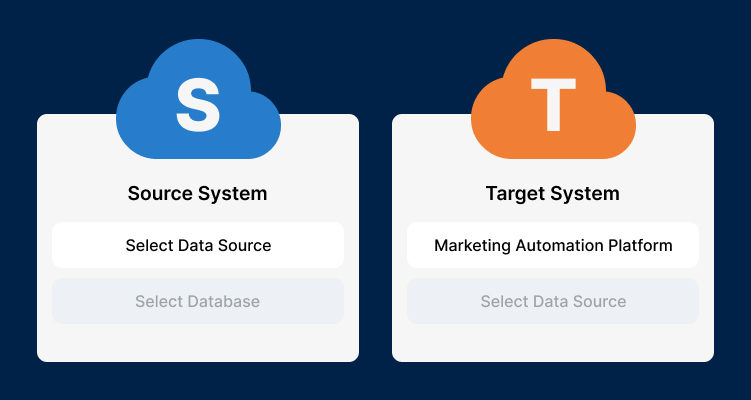
A correct setup is crucial to keeping customer records correct. Businesses can sync contacts, leads, companies and opportunities with HubSpot CRM Salesforce Integration.
There are two types of synchronization that an organization can select from: one-way and two-way synchronization. Two-way sync will ensure that whatever changes you make will be synced between the platforms.
Accurate field mapping salesforce HubSpot settings are critical for preventing data inconsistencies. Correct mapping also enhances customer data integration, providing teams with a comprehensive understanding of customer activity.
Moreover, the integration allows for workflow automation. This makes business processes easier, by doing tasks like assigning leads, sending notifications and following up. This helps to cut down on manual workload and improve efficiency.
To ensure the accuracy of data information over time, a lot of businesses depend on a certified HubSpot partner to ensure that the sync settings are optimized.
Common Integration Challenges and Best Practices
Salesforce integration with HubSpot is beneficial because it offers many advantages. However, businesses may have some problems when they are trying to implement Salesforce integration with HubSpot. Salesforce integration with HubSpot can be hard to set up and this is something that businesses have to deal with.
Duplicate records are a problem. They can cause confusion. Make reports wrong. When we try to sync things we might get errors because someone does not have the permission or because the fields are not mapped correctly.
To avoid these problems, businesses should clean their databases before implementation and test synchronization settings thoroughly. Using a dedicated integration account can improve security and simplify management.
Regular monitoring is equally important. Reviewing sync activity and data quality helps ensure information remains accurate and consistent.
For complex implementations, many organizations choose to hire HubSpot developers or invest in professional HubSpot integration services to achieve the best results.
Conclusion
HubSpot and Salesforce integration enable businesses to connect and streamline their workflows. The HubSpot CRM Salesforce Integration is incredibly useful for businesses as it can automate the process of data sharing, improving collaboration and visibility into customer activities.
Once implemented and optimized by an experienced HubSpot development company, businesses can streamline customer information, improve operational efficiency, and keep their sales and marketing teams aligned for long-term growth.

.webp?width=410&height=270&name=image%20(62).webp)
.webp?width=410&height=270&name=image%20(22).webp)