









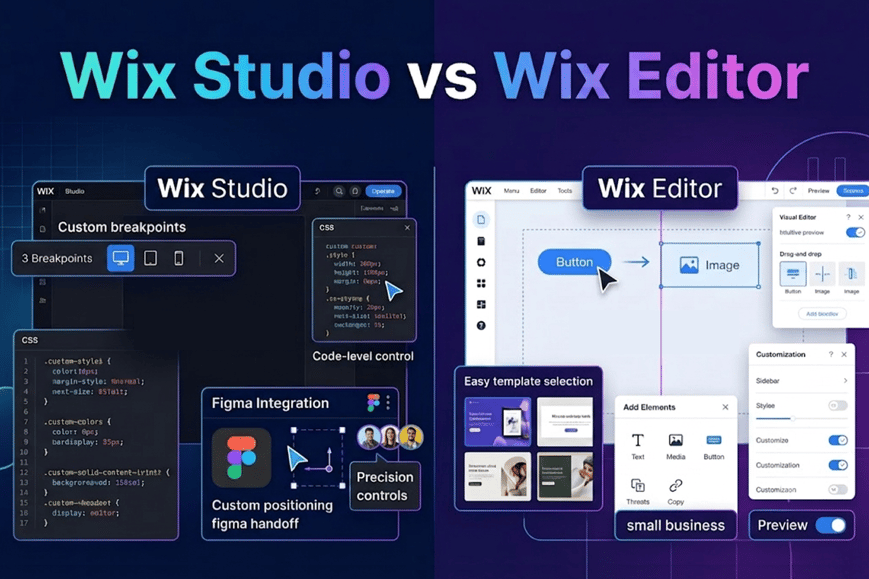
Wix now has two builders and the names make it sound like an upgrade path. It isn't. The Editor is where most small businesses build and run their sites. Studio is the builder, made for a different kind of user. This post settles the Wix Studio vs Wix Editor question for anyone planning Wix website development. It covers who each builder is, for how they compare on design, CMS, stores, client work and cost and what moving an existing site involves.
The quick answer
Wix’s own positioning is the cleanest place to start. It presents the Editor as the choice for DIY users and small businesses who build and maintain their own site. It presents Studio as the choice for agencies and professionals who want more design freedom and responsive control. Here is how that plays out in the wix studio vs wix editor choice:
|
You run a small business and edit your own site |
Editor |
|
You want ready-to-go features and a gentler learning curve |
Editor |
|
You are an agency or freelancer building for clients |
Studio |
|
You manage several client sites with a team |
Studio |
|
You need tight control over layout at every screen size |
Studio |
|
You have a live Editor site and want it rebuilt in Studio |
Studio, through a Studio version of the site (see below) |
Our rule of thumb: if you will be the one editing the site, start with the Editor. If a professional will build it and a team will keep refining it, start with Studio.
Design control and responsiveness
Studio is where Wix puts its advanced design tools. Its help center describes pixel-level control alongside Responsive AI, which applies responsive logic to a page or section in a few clicks. You also get custom breakpoints, modular flex layouts, proportional scaling and custom CSS. Wix’s own comparison page pitches the Editor as the user-friendly option with ready-to-go features, and Studio as the one for extra design freedom.
Studio also has a Figma to Wix Studio plugin. It exports Figma frames to a blank canvas or an existing Studio site, and you can import them as a page, section, container or stack. Wix advises matching the Figma frame width to the Studio editing size so the result comes out 1:1. For wix website design that starts in Figma, this removes a lot of rebuilding.
[ADD: one short example from your own builds, such as what changed in layout or responsiveness when you used Studio. We had no verified example to insert.]
CMS and dynamic content
Both builders use the Wix CMS. You keep content in collections, connect it to elements like repeaters, galleries and tables, and publish it through dynamic pages. Wix notes that static pages are capped at 100 per site, while dynamic pages are not subject to that limit.
The one difference between Wix's CMS overview flags is dynamic manage item pages, marked Studio Editor only. These let collaborators or approved members view, add, edit or delete collection items on the live site using input elements. If your project needs that, it points to Studio. Check Wix’s CMS overview for the current feature list before you commit.
eCommerce and apps
Both builders can run a Wix store. Wix lists eCommerce among Studio’s built-in business solutions, alongside Bookings, Restaurants, Events & Tickets, Blog and Subscriptions. The Studio help center says you can use dynamic pages for product categories, shape product pages freely, build custom cart pages with Wix Blocks, and customize checkout with APIs. Wix also says hundreds of apps in the App Market are compatible with Studio.
Apps need a check. Wix states that some apps are unsupported in Studio, so confirm any app your store depends on before choosing. For help planning a store, see our Wix eCommerce development service.

Working with agencies and clients
This is where agencies lean toward Studio. Wix designed the Studio workspace for agencies and enterprises. From one account you can manage projects, invite teammates with different roles and permissions, and belong to several workspaces. Several teammates can also edit the same Studio site at once and see changes in real time.
Handoff is straightforward. A client who receives a Studio-built site by ownership transfer, or is invited as a collaborator, can manage it without switching to Wix Studio themselves. For a professional building client sites, that is a real advantage in the wix studio vs wix editor decision.
Performance and SEO
Don’t expect Studio to be faster by default. Wix says it keeps improving live-site performance and prioritizes it for Studio, but it warns that sites heavy on video and content can run slower. Its advice is to test pages with PageSpeed Insights and follow its performance best practices, and that applies to both builders.
On SEO, you can edit SEO settings for dynamic pages from inside the editor. Picking a builder does not do the SEO work for you. If rankings matter, see our Wix SEO services. One caution: publishing a new site version can affect SEO, covered in the next sections.
Plans and cost
Check Wix’s official pricing pages for current numbers: Wix plans and its Studio plans page. Plans change, so we don’t quote prices here. Wix says creating a site in Studio is free, and a Studio plan unlocks premium features such as connecting a custom domain. To publish a Studio version of an Editor site, the site needs a Studio plan.

Can you move from the Editor to Studio?
You may still find older answers saying an Editor site cannot be migrated to Studio. Wix’s current guidance is different, so here is exactly what its help article says. The wix studio vs wix editor question gets tricky once you already have a live site.
Switching your account to the Wix Studio platform does not update your existing Editor sites. The route Wix now describes is a Studio version (branch) of the site:
- Who qualifies: the Editor site needs a Premium plan, and the account must have switched to the Wix Studio platform.
- No downtime while you build: creating the branch does not unpublish or affect the original site.
- Dashboard and data carry over: the branch shares the dashboard, so products, contacts and other business data are available.
- The design does not carry over: you rebuild it in the Studio Editor.
- Apps may not carry over: apps from the Editor install automatically when you first open the Studio branch, but some may not come across, and you can add them manually. Some apps are unsupported in Studio.
- Publishing needs a Studio plan: publishing unpublishes the live Editor version, and Wix says you cannot go back and republish the original Editor branch. It suggests duplicating the Editor site first if you might want it again.
- SEO can be affected: if the Studio branch has different content or structure, publishing it may affect rankings.
In practice, treat it as a rebuild with your data kept, not a one-click conversion.
Who should choose which
Here is the wix studio vs wix editor decision in short form.
Choose the Editor if:
- You build and update the site yourself.
- You want a simpler tool with ready-to-go features.
- You run one small-business site and don’t need a team workflow.
Choose Studio if:
- You build sites for clients or manage several sites.
- Your wix website design needs custom breakpoints, CSS or Figma handoff.
- You need Studio-only CMS features or a team workspace.
- You are rebuilding anyway and want more layout control.
When Wix Studio development is worth a partner
Studio is open to everyone, but it rewards experience. A wix certified partner earns their fee when the site is complex, when you are rebuilding an Editor site and want to protect SEO, or when you would rather not run the wix website development yourself.
Conclusion
The choice between Wix Studio and Wix Editor depends on who's managing the website. If the site owner plans to make their edits, the Wix Editor is the better place to start. For professionals who build websites for others or need advanced design options and better control over responsiveness Wix Studio is the right fit.
Still unsure how the wix studio vs wix editor choice applies to your site? Talk to our team about Wix Studio development and get a clear recommendation.


